
 latent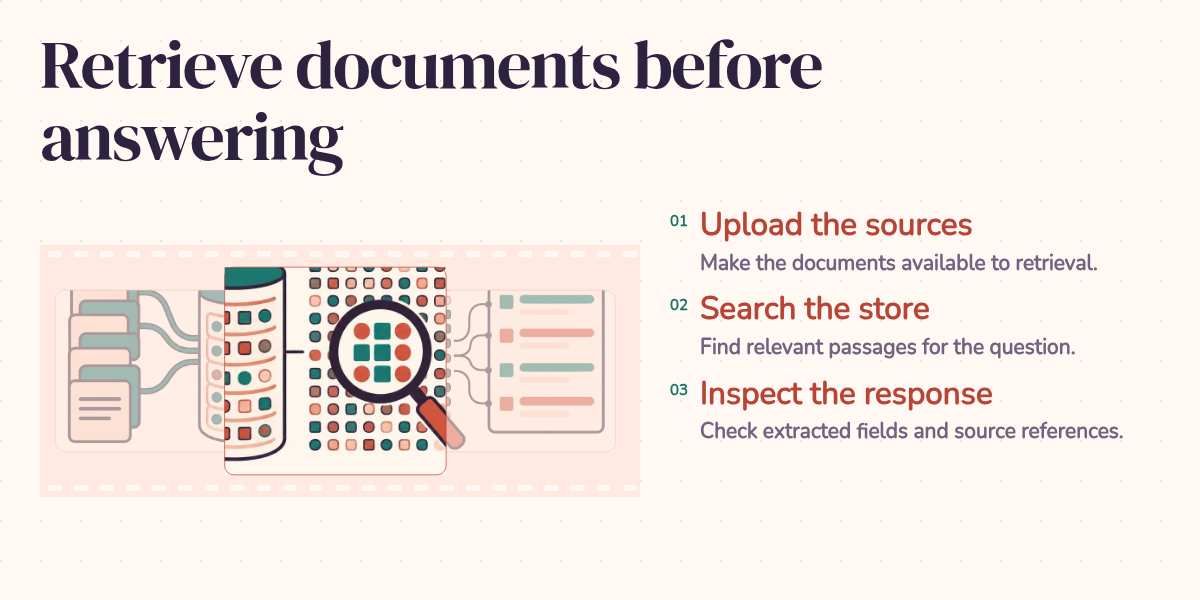
"Does this candidate have Python experience and a degree completed after 2020?" A resume might answer both questions. It might answer one. A useful assistant needs to tell the difference before a recruiter mistakes a plausible summary for a verified qualification.
Gemini File Search gives the model a way to search uploaded documents before answering. It also handles much of the machinery that makes those documents searchable. The interesting part is what happens after a relevant passage comes back: which claims does it support, and which questions remain open?
Start with what the document says
Consider this invented resume excerpt, used only to explain the workflow:
John Doe. Data analyst, Example Company, 2022 to 2024. Built Python scripts to clean sales data. Education: BSc Computer Science.
For the opening question, a well-supported answer would look like this:
The resume describes Python work on sales-data cleaning. It lists a Computer Science degree but gives no graduation date, so I cannot verify graduation after 2020. Source: John_Doe_Resume, experience and education excerpt.
That is an illustrative target answer, not a recorded Gemini response. Notice the distinction it preserves. The candidate's work dates tell us when the work happened. They don't tell us when the degree was completed. A citation to the right resume cannot make that missing date appear.
This is why I find document search useful and why I want the underlying passage close to the answer. The assistant can save a person the trouble of opening every file while still making it easy to check the few facts that matter. If it converts "not stated" into "doesn't qualify," it has changed the question without permission.
How the document reaches the model
Retrieval-Augmented Generation, or RAG, supplies relevant external material to a model while it answers. The 2020 RAG paper combined a retriever with a generator for knowledge-intensive tasks. The practical idea is familiar: give someone the relevant pages before asking them to explain what the records say.
A model's training does not give it access to a private resume uploaded this morning. RAG adds that access through a search step. The query retrieves passages; those passages become context for the answer. Updating the searchable documents can change the information available without retraining the model.
The retriever usually works on smaller passages because a document can cover several subjects. An embedding represents a passage as numbers so the system can compare its meaning with a question. That helps a search for "programming experience" find a passage about Python even when the words differ. Similarity still isn't proof that every condition in the question has been met.
Building this yourself means maintaining document ingestion, passage splitting, embeddings, storage, and retrieval. Gemini File Search manages those steps and supports common document formats, including PDF, DOCX, text, JSON, and code files. Your application uploads documents and connects a store to the model's request. The service can return source annotations alongside the answer.
Upload a resume, then ask a narrow question
The following example shows the integration, not a measured extraction result. Use the google-genai Python SDK, with GEMINI_API_KEY set in the environment. Supply a resume you are authorized to upload in place of the file path. Creating a store for this example keeps its search scope easy to understand.
The first block creates the store and waits for ingestion. A finished operation can contain an error, so completion alone should not count as success. Store resources also expose counts of active, pending, and failed documents in the File Search Stores reference.
from google import genai
import time

client = genai.Client()
file_search_store = client.file_search_stores.create(
    config={'display_name': 'Resume_Data_Store'}
)
print(f"File Search Store created: {file_search_store.name}")

file_path = 'path/to/your/resume.pdf'
operation = client.file_search_stores.upload_to_file_search_store(
    file=file_path,
    file_search_store_name=file_search_store.name,
    config={'display_name': 'John_Doe_Resume'},
)

print(f"Uploading file '{file_path}' to store...")
deadline = time.monotonic() + 300
while not operation.done:
    if time.monotonic() >= deadline:
        raise TimeoutError("Resume indexing is still pending; check the operation.")
    time.sleep(5)
    operation = client.operations.get(operation)

if operation.error:
    raise RuntimeError(f"Resume indexing failed: {operation.error}")
print("File upload and indexing operation completed.")
Next, ask for evidence of each qualification separately. The example follows Google's documented File Search workflow using the Interactions API and a supported model. The response exposes text and file citations through its output steps; see the Interactions API reference for the response structure.
prompt = (
    "Use John_Doe_Resume to check two things: evidence of Python work, "
    "and whether the degree was completed after 2020. "
    "For each, explain the supporting passage and cite the file. "
    "Say 'not stated' when a fact is missing. Do not infer graduation "
    "dates from employment dates. Also summarize the documented skills "
    "and the last two work experiences, if present."
)

interaction = client.interactions.create(
    model="gemini-3.8-flash",
    input=prompt,
    tools=[{
        "type": "file_search",
        "file_search_store_names": [file_search_store.name],
    }],
)

for step in interaction.steps:
    if step.type != "model_output":
        continue
    for block in step.content:
        if block.type != "text":
            continue
        print(block.text)
        for citation in block.annotations or []:
            if citation.type == "file_citation":
                print(f"Source: {citation.file_name}: {citation.source}")
The prompt makes the expected behavior explicit. It doesn't enforce it. Test the answer against the resume, including a version with the graduation date removed. A useful result should lose confidence in that one fact while retaining the supported Python experience. If the answer confidently fills in a year, the application has found a failure worth fixing before anyone relies on it.
For a candidate database, store the extracted fact with its source and review state. Keep an unknown date as unknown. If you request JSON, validate its structure and values before writing a row; syntactically valid JSON can still contain an invented year.
Searching an entire collection adds another distinction. "Find candidates with Python experience" can produce useful matches. It does not establish that the system found every eligible candidate or verified every requirement. When completeness matters, track which resumes were processed and evaluate each required field, rather than treating a short search result as a complete database query.
Watch the retrieval step in a recorded run
The site's own RAG assistant makes this sequence visible. Its blog_search tool queries the site's /api/search endpoint, then the agent uses the returned results to answer. These recordings demonstrate local search used by an agent. They are separate from the Gemini File Search integration above.
Recorded blog-search interactions: expand the tool result to inspect the returned article records, then compare them with the answer and its links. This is the site's search tool, not a recording of Gemini File Search processing resumes.
In the stored PostgreSQL example, the user asks what the blog says about vector search. The agent searches for "PostgreSQL vector search pgvector" and links to relevant articles in its answer. The tool returns article records, including titles and summaries, rather than the full article bodies. That matters when checking the response: a relevant title supports a reading recommendation, while a detailed technical claim may need the underlying article.
The recording shows where to inspect the handoff between search and generation. It is not an accuracy benchmark. The same inspection belongs in the resume workflow: look at what reached the model before deciding whether the answer follows from it.
What managed search changes in practice
Managed ingestion lets a team try document-grounded questions without first operating a separate vector database. It also moves some implementation choices into the service. I would judge that tradeoff using representative documents and questions: can the application retrieve the right passage, preserve its meaning, and show enough evidence for a person to check the answer?
Cost belongs in that evaluation. On October 20, 2026, Google's pricing table lists File Search embeddings at $0.15 per million tokens. Storage and query-time embeddings are free, but retrieved document tokens count toward model input, and generated output is billed at the selected model's rate. The File Search pricing section ties indexing charges to embedding pricing, so check the rate for the store's embedding model. The indexing price alone is not the cost of an answer.
Keeping documents current is also application work. An updated resume needs to replace or supersede its previous version, and access rules need to determine which documents a user can search. A successful upload does not settle either question. Nor does retrieval make fine-tuning obsolete: supplying changing facts and changing a model's learned behavior are different jobs, with different cost comparisons.
A useful answer keeps the missing fact missing
For the opening resume question, File Search can supply the document passages Gemini needs without making you build the ingestion and retrieval system yourself. That is a useful reduction in work. It gives the application a practical way to turn a folder of documents into evidence a reader can inspect.
The application still owns the meaning of the result. Python experience supported by a passage is a finding. A missing graduation date is an unresolved question. A search match is a candidate for review. Keep those distinctions visible, attach the source, and test both present and absent facts. Then the reader gets something better than a polished summary: a clear account of what the documents establish and what still needs an answer.