 latent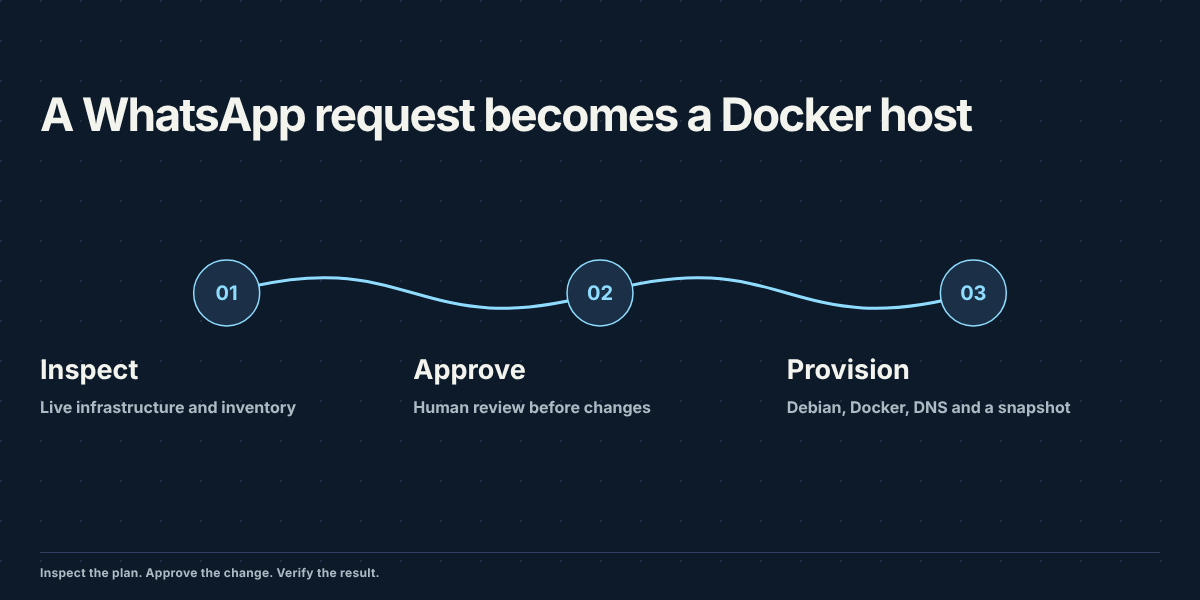
I've put in almost thirty years making sure databases don't fall over, so I don't hand out root lightly. My homelab, though, has reached the size where doing everything by hand is just wasting cycles: a four node Proxmox cluster, an OPNsense firewall, Technitium for DNS, TrueNAS, a Synology, managed switches, a few VLANs and a dozen or so containers and VMs. Every new service means the same chores. Create a container, patch it, install Docker, add a DNS record, take a snapshot, write it down somewhere.
So I configured Hermes Agent, from Nous Research, to do the chores. It it runs in a small LXC container on the cluster, and I talk to it from WhatsApp. This post is about how it's put together and what it takes, in tokens and tool calls, for it to provision a new server end to end. The narrated recording is on the Hermes project page. Here I want to stay on the engineering. This is a selected successful run after ten earlier practice attempts, not a first-try reliability test.
The pieces
I think about the system in four layers: a channel, a brain, a pair of hands and a set of rails.
The channel is WhatsApp. Hermes has a gateway that receives messages and routes each chat to a profile. My direct messages go to a profile called homelab; my family uses a different profile for calendars and lists. In my setup, the profiles have separate instructions, memory and sandboxes, and infrastructure credentials are mounted only into the homelab sandbox. That separation matters, but a profile name alone is not an operating-system security boundary.
The brain is the model plus its instructions. The homelab profile runs gpt-6-luna through a Codex subscription, so the supplied usage record has no per-token invoice. Those counts describe this session; they are not a dollar-cost estimate. Its instructions describe the lab, the tools and the rules of engagement in plain language. Hermes keeps a session store in SQLite, compresses context when a conversation gets long, and can load skills (reusable procedures it wrote or I wrote) when a task matches one.
The hands are a Docker sandbox built for this job. The Docker terminal backend starts shell commands there. Those commands can then reach other machines over SSH. The image carries nmap, arp-scan, dig, mtr, traceroute, tcpdump, snmpwalk, curl and jq, plus Python with requests, proxmoxer and paramiko. The container runs on the host network, drops all Linux capabilities and adds back only a handful, including the raw socket ones nmap needs. It gets two mounts. /lab is read-write and holds the working state: an inventory file that's the source of truth for the lab, a change log, runbooks and backups. /secrets is read-only and holds API tokens and the agent's SSH key. The agent is told never to print anything from it. Read-only prevents modifying the mounted files; it still lets the agent use the credentials and reach the infrastructure they authorize.
The approval policy and change log are how I supervise that access.
The rails
The center of it is a small CLI called lab. It wraps three APIs (Proxmox, OPNsense and Technitium) behind one interface: lab pve GET /cluster/resources, lab opn GET /api/diagnostics/interface/getArp, lab dns GET /api/zones/list. Reads go straight through. Any write is refused unless the call carries --confirmed "<what the human approved>", and every confirmed write is appended to /lab/changelog.md with the service, the method, the path, the HTTP status, the request body and the approval text. It also takes OPNsense and Technitium backups on demand.
The confirmation text is supplied by the agent. The CLI does not independently establish that a human approved the operation, and raw SSH or direct API calls can bypass it. The instructions add the policy:
- Reads are always allowed. The agent is expected to look before it acts: inventory first, then the live APIs.
- Any change starts with an exact plan (what, where, the values, the expected effect, the risk, the rollback) and a question: "Apply? (yes/no)". One yes covers only the plan that was shown.
- Back up OPNsense or Technitium before changing them, and offer a Proxmox snapshot before anything risky.
- Never create a firewall rule that could cut the management path between the agent and the firewall, DNS or Proxmox. Use OPNsense's savepoint flow for firewall changes. This provisioning run did not change firewall rules or test that rollback path.
- Deleting a VM, container, storage or zone needs a separate yes that names that exact object.
- Changes made over SSH, which the CLI can't see, get a change log line written by the agent right after the step.
Hermes also has a per-command approval layer of its own, with three modes: manual, smart (a second model call decides whether a command is risky enough to ask about) and off. Smart mode is useful but not deterministic, since the same task produces differently worded commands from run to run. For the provisioning run below it was off, and the plan approval was the human gate.
None of this is novel. It's a change advisory board for one person, the same thing any decent ops team runs. A written plan, an explicit approval and a change log are controls I can inspect. In this setup the log is writable by the agent, so it is not an immutable audit trail. What's new is how little friction it adds when the operator writes the plan for you.
One message, one server
The test was a single WhatsApp message asking for a Docker-ready container. In short:
- an unprivileged Debian 13 LXC called
workon a specific node, next free VMID, 4 cores, 8 GB of RAM, 2 GB of swap, 64 GB on ZFS, withnesting=1,keyctl=1so Docker runs inside it - the same bridge, VLAN and firewall setup as an existing app container, a static IP and a search domain
- root SSH locked to one public key, password login off, validated with
sshd -t apt full-upgrade, then Docker CE and the Compose plugin from Docker's repository, tested withhello-world- a Technitium backup and an A record for
work.home.thelatentsource.com - a snapshot called
baseline-docker, an inventory update and a change log entry per step
Here's what the agent actually did with that.
It started with reads. It pulled cluster resources to find the next free VMID, read the reference container's network config, listed the templates and storage on the target node, checked the DNS zone for an existing record, and looked for the target IP in the firewall's ARP table and DHCP leases. About 70 seconds after the message it sent back a plan with every value filled in and stopped to wait.
The plan also said the IP check was inconclusive: no ARP entry, lease or ping reply proves an address is reserved. It asked me to confirm availability and reply yes. I replied only "yes", and the agent proceeded. The build worked, but that reply did not resolve the ambiguity. An explicit reservation check belongs before creation.
After the yes, the build went through SSH as root on the Proxmox node, using pct. That's deliberate. Setting keyctl on a container is reserved for root@pam in Proxmox, and the agent's API token is a scoped token, not root. The API token stayed scoped, but root SSH gave the agent broad hypervisor authority. That is a substantial privilege, even when the instructions require it to log each change. The public key went into a temp file on the node, got passed to pct create --ssh-public-keys, and was deleted right after.
Everything inside the container ran through pct exec from the hypervisor: the upgrade, the Docker repository setup, the install, the hello-world test, and an sshd config change for key-only login. This Debian 13 guest used socket activation for SSH, so the agent validated the config with sshd -t and left ssh.service alone. After validating SSH, it created the baseline snapshot. The DNS work went through the lab CLI: backup first, then the record, then a read-back. The inventory edit and final verification followed.
One detail I like a lot: the agent never logged into the server it built. The only key on that box is mine, and all of its work went through the hypervisor. That avoids installing the agent's SSH key in the guest. It still retains access through the hypervisor. I verified the result myself afterwards with dig against my DNS and an SSH login with my own key. The recording shows that login and another successful hello-world run. It does not show a rejected password login; the agent checked the SSH configuration and its syntax.
Not everything went cleanly inside the run. One of its edits to the inventory file failed because the lines it expected weren't there. It sent a corrected edit about thirteen seconds later and moved on, without asking me. It repaired a mismatched patch without another message from me. A script can also handle expected failures; this was a useful recovery from an edit the agent had generated incorrectly.
The numbers
From the WhatsApp request at 20:43:49 UTC to the summary at 20:50:03 took about 6 minutes 14 seconds. The full recording is 8 minutes 57.5 seconds, including typing and my independent check. The narrated edit accelerates waits and labels playback speeds and held frames.
The supplied usage log continues through 20:50:31. It records 29 model calls through the summary, then three more calls during post-summary work. Its 32-call total should not be presented as the cost of reaching the summary alone.
| Phase | Model calls | Input tokens | Output tokens |
|---|---|---|---|
| Preflight and plan | 7 | 185,063 | 2,296 |
| After approval through summary | 22 | 936,759 | 7,482 |
| After summary | 3 | 162,210 | 1,120 |
| Whole logged session | 32 | 1,284,032 | 10,898 |
The full logged session totals 1,294,930 tokens and about 279 seconds of reported model-call latency. That latency includes the post-summary calls and is not a clean breakdown of the six-minute provisioning time. The supplied session export contains 33 tool calls: 21 terminal commands, three file reads, three patches, two task-list updates, and four skill lookups. Tool calls and model calls count different things.
Input accounts for 99.2% of the logged tokens. Repeated instructions, conversation history and command output make the input much larger than the responses, which average about 341 output tokens per call. The largest call carried 56,582 input tokens. Context compression means later requests need not contain the entire original conversation. These are accumulated token counts, not unique text or a measurement of cache savings.
The per-call CSV makes the accounting inspectable. The earlier practice attempts and a safety-reviewer model are excluded; that reviewer was off for this take.
One detail deserves more attention than the token total. After a context compression, Hermes rewrote an earlier change-log entry from "49 packages upgraded" to "completed successfully". The retained command output did not support the package count, so removing it was a correction. The sequence does not prove compression caused the edit. It does prove the agent can rewrite its own history. I want corrections appended as new entries, with the original retained, and a log destination the agent cannot rewrite.
Where I land
A shell script can build a container faster, and Hermes wrote one for this exact job afterwards. What I get from the agent is the reasoning around the commands: it reads the real state of the lab before acting, fills in values I didn't spell out by looking at an existing container, picks the right path when the API can't do something, recovers from its own small mistakes, and leaves a record that I can audit. For a homelab that keeps changing, that's worth more than raw speed.
What I'm not giving up is the yes. The agent is good at the work, but it's still a non-deterministic system, and a plan I can read in ten seconds is a very cheap price for knowing exactly what's about to change on my network. The next improvements are specific: resolve IP reservations before creation, enforce approval outside the agent's own command text, and store the audit trail beyond its write access. The narrated project recording shows the successful run, including its patch error and my independent check.